System Telemetry
Redefined with Elegance
An ultra-clean, information-dense desktop utility built for developers, power users, and PC enthusiasts. Port socket auditing, 10s thermal stress benchmarking, RAM velocity forecasting, and PATH debugging.
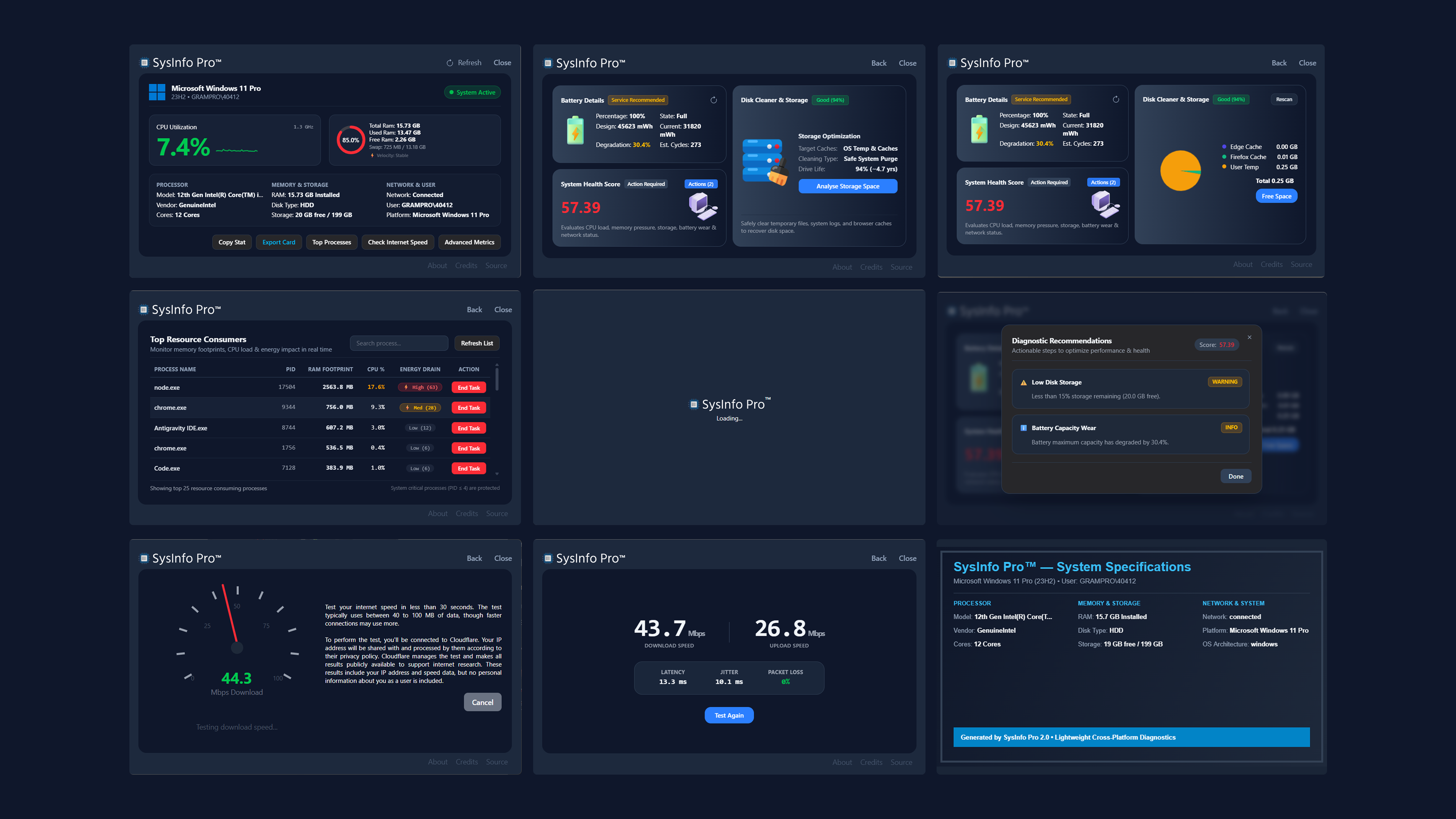
Engineered for Peak Clarity
No bloatware. No registration. Just instant, authoritative hardware metrics.
Resource Velocity Forecast
Continuously tracks RAM consumption velocity (MB/s) and predicts Out-Of-Memory slowdowns before your OS freezes.
Multi-Stream Speed Test
Parallel 4-stream CDN speed engine measuring download/upload Mbps, ping latency, jitter, and packet loss with M-Lab precision.
1-Click Spec Card Exporter
Generates a high-res PNG hardware specification badge saved directly to your Downloads folder for sharing on GitHub & social media.
Safe One-Click Disk Purge
Scans and safely eliminates temporary system files, log dumps, and browser caches with real-time freed storage feedback.
Battery Longevity Analytics
Deep battery degradation %, design vs current mWh capacity, cycle count estimates, and operational health badges for laptops.
Per-Process Energy Rating
Calculates an Energy Impact score (1-100) per running process to immediately spot background tasks draining your battery.
Port & Socket Inspector
Audit active listening TCP/UDP sockets (e.g. :3000, :8080), inspect owner process PIDs, and release port-blocking processes with 1 click.
10s Thermal Stress Benchmark
Lightweight multi-threaded CPU stress burn measuring thermal headroom rating (1-100), fan lag, and clock speed throttling delta under load.
Startup Impact Manager
Scans Windows Registry Run keys and startup folder triggers, calculating boot delay impact scores (High, Med, Low) to eliminate boot lag.
Environment & PATH Debugger
Parses system %PATH% entries, flags broken or non-existent directories, highlights duplicates, and audits developer variables (JAVA_HOME, CUDA).
Software Health & Version Auditor
Audits installed software & developer runtimes, comparing current vs official latest releases with 1-click official vendor download links.
Download & Security Guide
Why Windows SmartScreen or Chrome may display a warning, and how to safely run SysInfo Pro.
Why does Chrome or Windows flag unsigned executables?
Understanding Code Signing Certificates for Independent Open-Source Software
Operating systems like Windows Defender SmartScreen and browsers like Google Chrome require software binaries to be signed with an EV (Extended Validation) Code Signing Certificate. These corporate certificates cost $400 to $600+ every year from Certificate Authorities (DigiCert / Sectigo).
As a free, independent open-source utility without commercial funding, subscription fees, or venture backing, we invest our resources directly into building clean code rather than paying annual certificate authority fees. Because SysInfo Pro is unsigned, browsers and Windows issue automated "Unknown Publisher" or "Uncommon Download" prompts.
.exe without modifying system registry.
Download Executable
Click Download Free for Windows to save the official sysinfopro.exe binary to your Downloads folder.
Chrome / Edge Download Prompt
If Chrome flags "not commonly downloaded", click the three dots (...) next to the download → Select Keep → Keep anyway.
Windows SmartScreen Prompt
If Windows shows "Windows protected your PC", click More info → Click Run anyway to launch.